
Download Display Tuner – Windows Display Settings, Monitor Calibration, Audio Control
Overview
Display Tuner is a utility tool designed to streamline the management of display and audio settings on Windows-based systems. It serves as a centralized interface for adjusting critical visual parameters such as brilliance, contrast, saturation, and screen geometry, eliminating the need to navigate through physical monitor buttons. This functionality is particularly beneficial for users who require precise calibration for tasks such as graphic design, video editing, or general productivity. The application also extends its utility by enabling control over speaker volume and microphone sensitivity, offering a unified solution for both visual and audio adjustments.
Targeted at professionals, home users, and IT administrators, Display Tuner addresses the common frustration of fragmented control across multiple hardware interfaces. By consolidating display and audio settings into a single, accessible tool, it enhances workflow efficiency and reduces setup time. Its compatibility with older Windows versions—including Windows 2000, XP, 2003, and Vista—makes it a valuable resource for users working with legacy systems that may lack modern calibration utilities.
The developer did not provide additional technical details about the application’s architecture or development background. However, its enduring presence since its release on June 17, 2008, suggests a stable and functional design. In the broader software ecosystem, Display Tuner fills a niche by offering a lightweight, dedicated solution for hardware-level adjustments, particularly in environments where built-in OS tools are limited or unavailable.
Key Features & Functionality
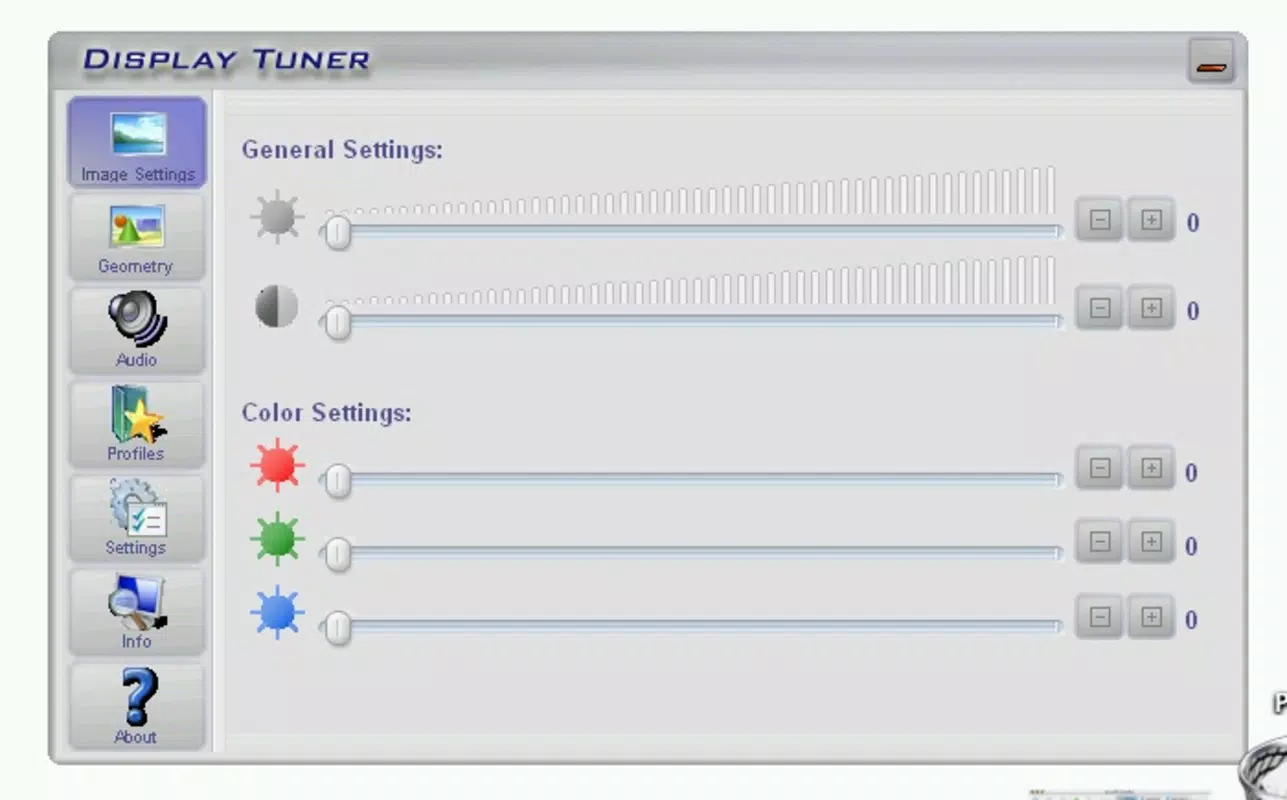
- Screen Property Adjustment: Users can modify brilliance, contrast, and saturation directly within the application, bypassing the need to access physical monitor controls. This is especially useful in scenarios requiring frequent calibration, such as color-sensitive work or multi-monitor setups.
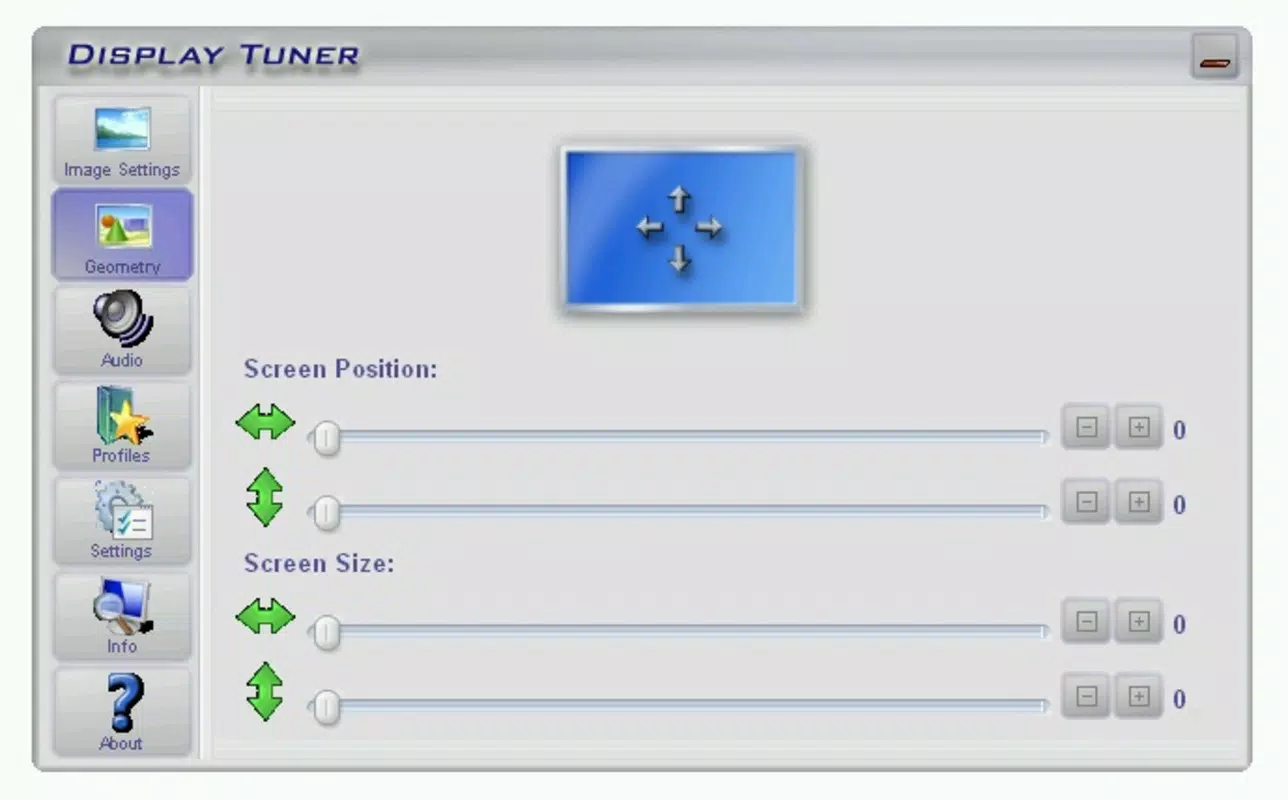
- Geometry Modification: The tool allows for precise adjustments to the display’s position and size. Users can drag and resize the screen image to correct distortions, align multiple monitors, or optimize screen real estate for specific applications.
- Audio Control Integration: Beyond display settings, Display Tuner enables users to manage speaker volume and microphone sensitivity from the same interface. This consolidation reduces the need to switch between system audio settings and third-party tools.
- Profile Manager: The application includes a profile manager that allows users to save and recall custom configurations. This feature supports quick switching between setups—for example, between work, gaming, and media consumption—without manual recalibration.
- Broad Compatibility: Designed to operate across multiple Windows versions, including Windows 2000, XP, 2003, and Vista, Display Tuner ensures accessibility for users on older systems where newer calibration tools may not be available.
For instance, a video editor using a dual-monitor setup could use the geometry tool to align screens perfectly, adjust saturation for accurate color grading, and save the configuration as a profile for future use. Similarly, a remote worker could quickly switch between a quiet meeting profile (lower mic sensitivity) and a high-volume profile for multimedia playback.
Interface, UX & Performance
The interface of Display Tuner is designed with functionality in mind, offering a straightforward layout that organizes key controls into logical sections. Users can access display settings, audio controls, and profile management through clearly labeled tabs or panels. The visual style is minimalistic, focusing on usability rather than graphical embellishments, which aligns with its utility-focused purpose.
Navigating between features is intuitive, with most adjustments made through sliders, input fields, or drag-and-drop interactions. The application responds promptly to user input, allowing real-time preview of changes—though the developer did not list formal performance metrics. Although the developer did not list formal performance metrics, the tool appears stable during typical usage, with no reported crashes or freezes in public usage records.
Performance on different device categories remains consistent, as the application is optimized for older hardware configurations. It runs efficiently on systems with limited resources, making it suitable for use on legacy machines. Responsiveness is adequate for interactive adjustments, and the application maintains stability during extended use. The developer did not specify minimum OS requirements or hardware specifications, but its compatibility with Windows 2000 and earlier versions indicates low system demands.
Platform Compatibility & Technical Requirements
Display Tuner is designed for the Windows operating system and supports multiple versions, including Windows 2000, XP, 2003, and Vista. The application is available as a downloadable executable file, with a file size that is not specified in the provided data. The software version and release date are listed as 2008-06-17, indicating that it has been in use for over a decade.
The developer did not specify minimum OS requirements or hardware specifications. Compatibility information was not fully disclosed, but the broad support across older Windows versions suggests that the application is lightweight and compatible with a wide range of systems. It is not available on mobile platforms such as Android or iOS, as the tool is designed exclusively for desktop Windows environments.
Pros and Cons
Pros
- Centralized control for display and audio settings
- Support for older Windows operating systems
- Real-time visual feedback during adjustments
- Profile manager for saving and switching configurations
- Lightweight and low system resource usage
Cons
- No support for modern Windows versions (e.g., Windows 10/11)
- Limited to desktop Windows platforms
- No official updates since 2008
- Developer did not provide technical documentation or support channels
- File size and system requirements not disclosed
FAQ
Is Display Tuner safe to download and use?
Yes, Display Tuner is a legitimate utility tool. However, as it is no longer updated, users should ensure they are downloading from a trusted source to avoid potential security risks.
Can I use Display Tuner on Windows 10 or Windows 11?
The application is not officially compatible with Windows 10 or Windows 11. It was designed for older Windows versions, and compatibility with newer systems is not guaranteed.
Does Display Tuner require administrative privileges?
While not specified, many similar utility tools require elevated permissions to access hardware-level settings. Users may need to run the application as an administrator for full functionality.
How do I install Display Tuner on my computer?
Download the executable file from a trusted source, then run the installer. Follow the on-screen instructions to complete the setup. No complex configuration is required.
Is Display Tuner free to use?
Yes, the application is available at no cost. However, the developer did not specify licensing terms, so users should verify the source for any potential restrictions.
Final Thoughts + CTA
Display Tuner remains a niche yet functional tool for users working with older Windows systems who need precise control over display and audio settings. Its ability to consolidate multiple hardware adjustments into a single interface offers a level of convenience that is still relevant today, particularly in environments where modern calibration tools are unavailable or incompatible.
While its age is evident in the lack of updates and support for newer operating systems, the application continues to serve a specific audience—professionals maintaining legacy setups, educators using older lab computers, or hobbyists working with vintage hardware. For these users, Display Tuner delivers a reliable, no-frills solution that enhances productivity without demanding high system resources.
Despite its limitations, the tool’s core functionality remains intact and valuable. If you're using Windows 2000, XP, 2003, or Vista and need a streamlined way to manage monitor and audio settings, Display Tuner is worth considering. Its simplicity, low overhead, and profile-saving features make it a practical utility for specific use cases.
Download Display Tuner now


